Stocktake Exporter
Stocktake Exporter Plugin
The Stocktake Exporter Plugin provides custom "stocktake" export functionality for Part data.
It utilizes the ExporterMixin mixin to provide a custom export format for stocktake data.
This exporter plugin can be used to export a comprehensive list of current stock levels for selected parts.
Activation
This plugin is an optional plugin, and must be enabled in the InvenTree settings.
Plugin Settings
There are no configurable settings for this plugin.
Usage
This plugin is used in the same way as the InvenTree Exporter Plugin, but provides a custom export format for stocktake data.
Export Options
When exporting part data, the Stocktake Exporter plugin is available for selection in the export dialog. When selected, the plugin provides some additional export options to control the data export process.
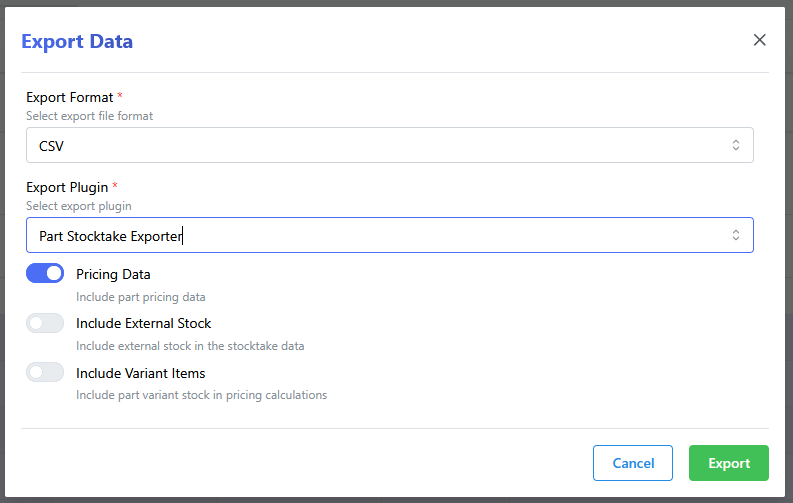
| Option | Description |
|---|---|
Pricing Data |
Include pricing data in the export. This will add columns for the cost of "stock on hand". |
Include External Stock |
Include stock from external warehouses in the export. This will add columns for the stock levels in external warehouses, and include the external quantities in the total stock count and valuation. |
Include Variant Items |
Include variant items in the export. This will add columns for the variant items associated with each part, and include the variant quantities in the total stock count and valuation. |